
Ceph Squid reaches end of life on 31 October: how to upgrade to Tentacle, and the CephX keys to rotate on the way
Ceph Squid reaches end of life on 31 October 2026. What Tentacle changes, the upgrade order for cephadm and Proxmox, and the CephX keys to rotate.
Ceph 19.2 Squid reaches end of life on 31 October 2026, according to the Ceph release index. On 1 November nothing in your cluster stops working. What stops are fixes: an archived release gets no bug fixes and no backports. The last time that mattered was 19 August 2026, when Ceph shipped four CVE fixes in one release and asked every operator to upgrade "as soon as possible". The next fix of that kind will land in Tentacle only. This article covers what changes with Ceph 20.2 Tentacle, the order of the upgrade for cephadm, package-based and Proxmox VE clusters, and the CephX key rotation that the August release added to every upgrade plan.
What happened: one security release turned a routine upgrade into a two-step job
Upgrading Ceph from one stable release to the next has been a well-worn path for years: monitors, managers, OSDs, MDS, RGW, then raise the minimum OSD release. That part has not changed. What changed is the security release of 19 August 2026, Squid 19.2.6 and Tentacle 20.2.4. It fixes an authentication bypass in CephX (CVE-2025-30156) and three further flaws in the Monitor and the RADOS Gateway, and it introduces a new CephX key type, aes256k. The fixed binaries are only half of the fix. The other half is replacing the old keys, and that touches every client that talks to the cluster.
Release        First      Latest point         End of life
------------------------------------------------------------------
Reef 18.2      07.08.2023 18.2.8 (20.03.2026)  20.03.2026, archived
Squid 19.2     26.09.2024 19.2.7 (12.10.2026)  31.10.2026, estimated
Tentacle 20.2  18.11.2025 20.2.4 (19.08.2026)  01.06.2027, estimated
Source: docs.ceph.com/en/latest/releases, read 27.10.2026.
Two numbers in that table deserve a second look. Tentacle's estimated end of life is June 2027, so the release you upgrade to now has about seven months of support left. And the dates are estimates: in July the index still gave 19 September for Squid. Plan the next major upgrade for the first half of 2027, and treat this one as a rehearsal for it.
What Tentacle changes, and what it removes
Most of Tentacle is opt-in. The features that matter for an existing cluster:
- FastEC for erasure-coded pools. Partial reads and writes on EC pools, enabled per pool with the allow_ec_optimizations flag. The upgrade does not switch it on. Turn it on for one pool first and watch it.
- New erasure-code default for new pools. New EC pools use ISA-L instead of Jerasure. Upgraded clusters keep their existing defaults.
- Faster BlueStore WAL and better compression. No action needed.
- Cephadm gets a management gateway, OIDC single sign-on via oauth2-proxy and an internal certificate manager. Useful when several admins share the dashboard.
- An SMB manager module that creates Samba shares on CephFS.
Two points hurt if you miss them:
- The mgr/restful and mgr/zabbix modules are removed. Both were deprecated in 2020. If your Zabbix dashboards read Ceph through the mgr module, they go blank after the upgrade, without an alert. Move to the Prometheus exporter or the dashboard API before the window, not after.
- Upgrade paths are narrow. Tentacle accepts upgrades from Reef or Squid only, and there is no downgrade. Go straight to the latest Tentacle point release: from Squid 19.2.6 or later, Tentacle daemons older than 20.2.4 fail to start. Once you run ceph osd require-osd-release tentacle, the way back is a restore from backup.
Before the window: six checks
- Cluster health. No down, recovering, incomplete, undersized or backfilling placement groups. If ceph -s does not show HEALTH_OK, fix that first.
- Versions. ceph versions must show one release everywhere. Mixed point releases are fine to upgrade from; mixed major releases are a project of their own.
- Monitoring. Check ceph mgr module ls for restful and zabbix (see above).
- Clients. List every client of the cluster: hypervisors, Kubernetes nodes with ceph-csi, backup servers, S3 applications. Note the kernel version of each one that mounts RBD or CephFS through the kernel. This list decides the CephX part of the plan.
- Multisite RGW. If you replicate between zones, set rgw_sigv4_insecure to true before you start and back to false once all zones run the new release. Without it, S3 requests between upgraded and non-upgraded zones can fail.
- Backups. A recent backup of everything you cannot rebuild, with a tested restore. There is no downgrade.
The upgrade: cephadm clusters
With cephadm the orchestrator handles the order. Turn the PG autoscaler off for the duration, start the upgrade and watch it.
ceph osd pool set noautoscale
ceph orch upgrade start --image quay.io/ceph/ceph:v20.2.4
ceph orch upgrade status
ceph -W cephadm
# pause / resume / stop if needed (stop does not roll back):
ceph orch upgrade pause
ceph orch upgrade resume
# after the upgrade:
ceph osd pool unset noautoscale
ceph health detail
Source: Ceph v20.2.0 Tentacle release notes, ceph.io, 18.11.2025.
Since 20.2.4, cephadm also rotates the OSD and MDS keys to aes256k after the images are updated, so the upgrade runs longer than you may be used to. Client keys are not rotated automatically: that part is yours.
The upgrade: package-based clusters and Proxmox VE
Without cephadm the order is manual. Monitors first, then managers, OSDs, MDS and RGW, one node at a time, waiting for a healthy cluster between nodes.
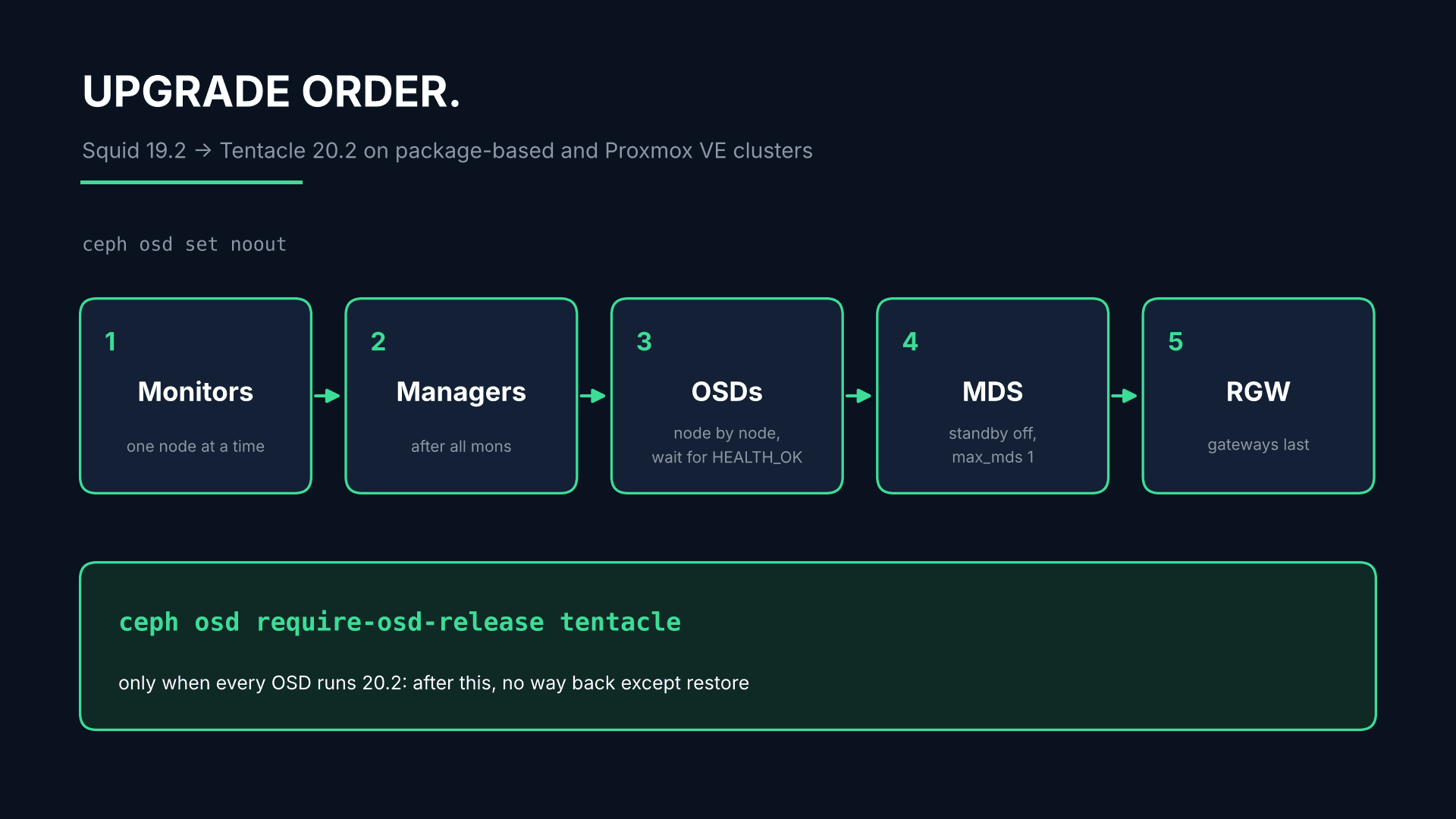
ceph osd set noout
# on each node: install the Tentacle packages (Proxmox VE: apt full-upgrade), then
systemctl restart ceph-mon.target         # one node at a time
ceph mon dump | grep min_mon_release      # expect: 20 (tentacle)
systemctl restart ceph-mgr.target
systemctl restart ceph-osd.target         # one node at a time, wait for HEALTH_OK
# CephFS, per file system: note max_mds and allow_standby_replay first
ceph fs set <fs_name> allow_standby_replay false
ceph fs set <fs_name> max_mds 1
systemctl stop ceph-mds.target            # on the standby MDS nodes
systemctl restart ceph-mds.target         # on the remaining active MDS
systemctl start ceph-mds.target           # on the standby MDS nodes
ceph fs set <fs_name> max_mds <original_max_mds>
ceph fs set <fs_name> allow_standby_replay <original_value>
systemctl restart ceph-radosgw.target
# only when every OSD runs 20.2:
ceph osd require-osd-release tentacle
ceph osd unset noout
Sources: Ceph v20.2.0 Tentacle release notes; Proxmox VE wiki "Ceph Squid to Tentacle".
On Proxmox VE the same sequence applies, with three additions from the Proxmox upgrade guide. The nodes must run an up-to-date Proxmox VE 9: the guide names 9.1 as the minimum, Proxmox's key migration notice of September names 9.2. A cluster still on Proxmox VE 8 needs that upgrade first, in a separate window. The repository switch is a one-line change from squid to tentacle in /etc/apt/sources.list.d/ceph.sources on every node. And OSDs created under Ceph Octopus or earlier can show growing META usage after the upgrade (known up to 20.2.4): check the META column in ceph osd df and compact those OSDs one at a time, off-peak, with ceph daemon osd.<id> compact.
The part that is new: rotating CephX keys to aes256k
As soon as the first Tentacle monitor runs, the cluster reports a series of AUTH_INSECURE health warnings and errors, up to HEALTH_ERR. They are expected. They say the cluster still uses and accepts the old key type, and they disappear step by step as you replace it. The order matters: service keys first, then client keys, and only when every client works with its new key do you stop accepting the old ones. The health checks documentation is explicit that AUTH_INSECURE_KEYS_ALLOWED must not be resolved before AUTH_INSECURE_SERVICE_KEY_TYPE.
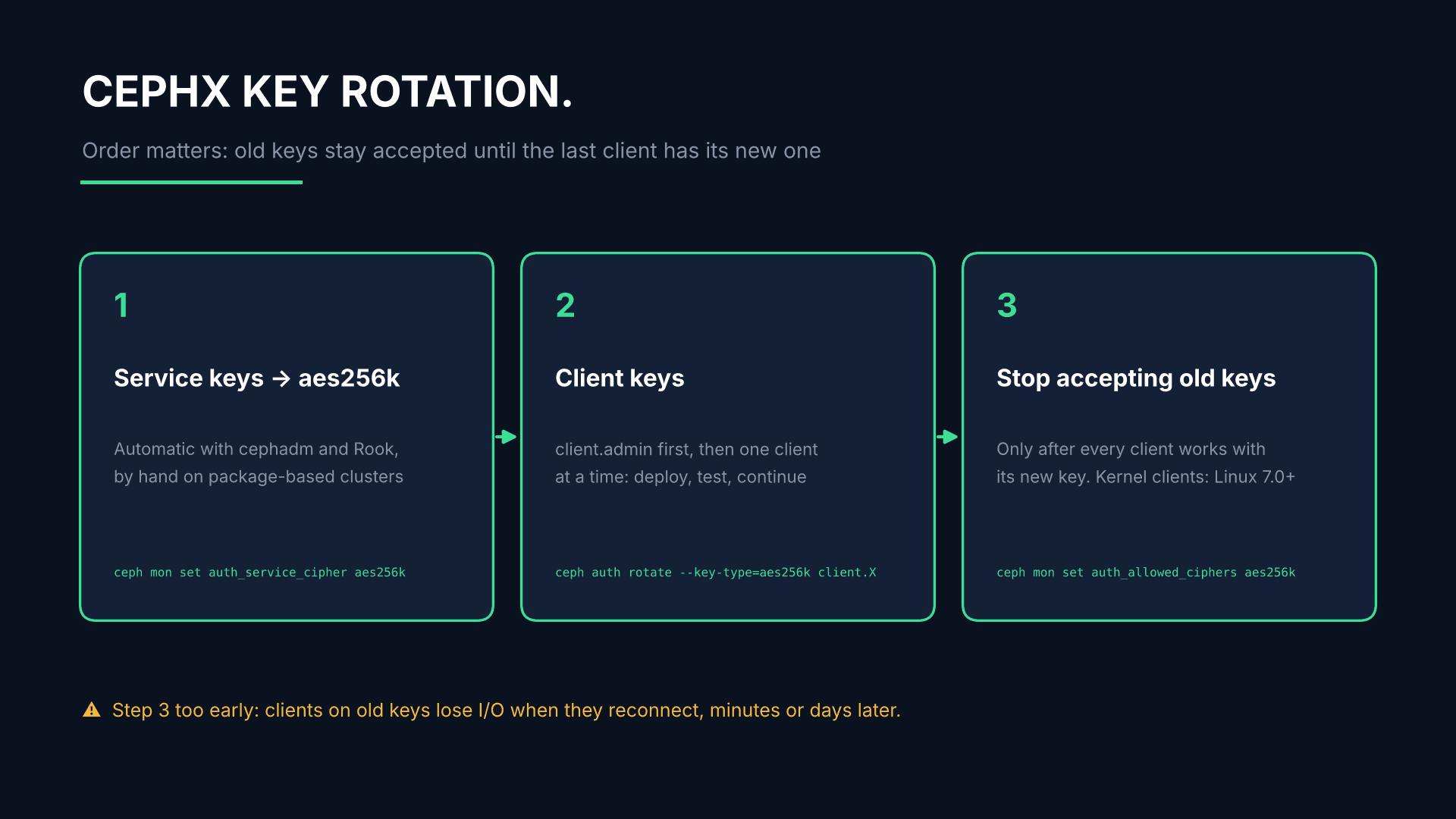
# 1. Service keys (automated by cephadm and Rook; by hand on package-based clusters)
ceph auth rotate --key-type=aes256k mds.a > MDS_A_KEYRING
#    once all service daemons run a fixed release:
ceph mon set auth_service_cipher aes256k
# 2. Client keys, client.admin first: one client at a time, deploy the new keyring, test, continue
ceph auth rotate --key-type=aes256k client.X > CLIENT_X_KEYRING
# 3. Only after every client works with its new key:
ceph mon set auth_allowed_ciphers aes256k
ceph config set mon mon_auth_allow_insecure_key false
Source: docs.ceph.com, RADOS health checks, AUTH_INSECURE_* section, read 27.10.2026.
Rotate client.admin first and put its new key into your admin keyring: once the cluster accepts only aes256k, an old admin key locks you out.
The trap is the kernel. Kernel RBD and CephFS clients support aes256k from Linux 7.0, with backports in CentOS Stream 9 and 10; for other distributions, ask your vendor. A hypervisor or Kubernetes node on an older kernel keeps working only as long as the cluster still accepts the old key type. Restrict the ciphers before that client is upgraded, and its I/O fails when it reconnects or its service tickets expire: minutes or days later. On Proxmox VE, the script pve-cephx-rotate-service-keys from Proxmox's key migration notice keeps old and new keys valid side by side while you refresh clients, including running guests and CephFS mounts. Without --apply it only does a dry run: start there.
What we saw doing this upgrade in production
We have run this upgrade on a production Proxmox VE cluster. Six things we would tell any team before its window:
- The cluster turns red as soon as the first Tentacle monitor runs. Every internal cephx key was created with AES-128, and Tentacle flags those keys as insecure (CVE-2025-30156). Nothing is broken, but the cluster stays at HEALTH_ERR until the keys are replaced. Plan the key rotation as its own change, and mute the AUTH_INSECURE warnings during the upgrade so that real problems stay visible.
- The service keys took minutes, the admin key took a night. The Proxmox script rotated the monitor, manager, OSD and MDS keys live. The admin key is different: every running VM holds it open, and a reboot inside the guest is not enough. Each VM has to be live-migrated once to pick up the new key. We moved every VM in the cluster in one night, each with well under a second of interruption.
- Kubernetes nodes keep the old key type. Nodes on current Ubuntu LTS kernels (5.15 and 6.8) cannot use aes256k, so we could not restrict the cluster to the new cipher. We muted the remaining warnings instead of forcing it.
- A network blip during the package phase became an hour-long outage for some CephFS clients. While the host packages were upgraded, the VMs on each host lost network for about a minute: a hypervisor networking issue, not Ceph. The connections from the Kubernetes nodes to the metadata servers never came back; the clients were evicted after five minutes and blocklisted for an hour. Mounts with recover_session=clean reconnected on their own once the blocklist expired. The others stayed broken until we fixed them by hand. This applies beyond upgrades: any CephFS kernel client can be blocklisted after a network blip, a host failover or an MDS restart. With recover_session=clean the mount recovers by itself; the trade-off is that unflushed writes from before the eviction are lost, which for most workloads beats a hung mount. Newer ceph-csi versions set it by default; check that yours does.
- The Ceph part itself was uneventful. Restarting monitors, managers, OSDs and MDS across the cluster took about 16 minutes, and every storage host was healthy again within 40 seconds of its restart. The preparation (health check, version check, a recorded baseline, verified backups) is what makes it boring.
- Do not move workloads onto a freshly rebooted host right away. After the follow-up reboots, two Kubernetes nodes migrated onto a just-rebooted host lost all their storage connections and had to be reset. Check a freshly booted host with a test VM first: RBD volumes in a guest do not recover from a long blackout.
When to wait
Do not start the upgrade in the last week of October just because of a date. An unhealthy cluster, a monitoring stack that depends on the Zabbix module, or a fleet of kernel clients you cannot update this month are good reasons to wait a few weeks. The end-of-life date alone is not a reason to hurry. Squid 19.2.7 already contains the August security fixes. What it will not get is the next one. If you stay on Squid for now, write down the date you will move and what blocks you until then.
What we do
Hostzero plans, builds and runs Ceph clusters in Frankfurt, on your premises or across both. With Managed Ceph, upgrades like this one are part of operations: we check health, clients and kernels, plan the window, run the upgrade and the CephX rotation, and stay on call until the warnings are gone. Managed Ceph Operations start at €500 a month. If you run the cluster yourself and only want this upgrade done, we quote it after a health check. For clusters that are already in trouble, our emergency support and data recovery is available 24/7 at €250 an hour, also for clusters we did not build. Tuning after the upgrade is covered in our article on Linux defaults that slow down Ceph, and isolating Kubernetes tenants on one cluster in our article on multi-tenant ceph-csi. All prices net, as of October 2026.
Frequently asked questions
When does Ceph Squid reach end of life?
The Ceph release index lists 31 October 2026, marked as an estimate. After that date Squid receives no bug fixes or backports. The cluster keeps running.
Can I upgrade from Reef directly to Tentacle?
Yes. Tentacle accepts upgrades from Reef 18.2 and Squid 19.2. Older releases such as Quincy must first move to Reef or Squid. Whatever you start from, go to the latest Tentacle point release. On Proxmox VE, the Ceph upgrade also requires an up-to-date Proxmox VE 9.
Can I roll back to Squid after the upgrade?
No. There is no downgrade path. Once ceph osd require-osd-release tentacle is set, the only way back is a restore from backup. That is why the backup check comes before the window.
Do I have to rotate the CephX keys?
The new key type comes with the fix for CVE-2025-30156, an authentication bypass in CephX. Until you rotate, the cluster reports AUTH_INSECURE warnings and still accepts the old keys. Cephadm rotates the daemon keys automatically, Rook also some client keys. The remaining client keys, and all keys on package-based clusters, are rotated by hand.
How long does the upgrade take?
It depends on the number of OSDs and on how long each node takes to return to HEALTH_OK. On cephadm clusters the key rotation after the image update adds time. Plan the rotation of client keys as a separate step, not as part of the upgrade night.
Have questions about this topic?
Our experts are happy to advise you on your individual strategy.
Schedule a consultation