
Microsoft 365 Exit: Sovereign Email After the July 2026 Price Increase
Microsoft raised 365 prices in July 2026 — with an AI surcharge built in. What the increase costs, who should leave, and how a sovereign email exit works.
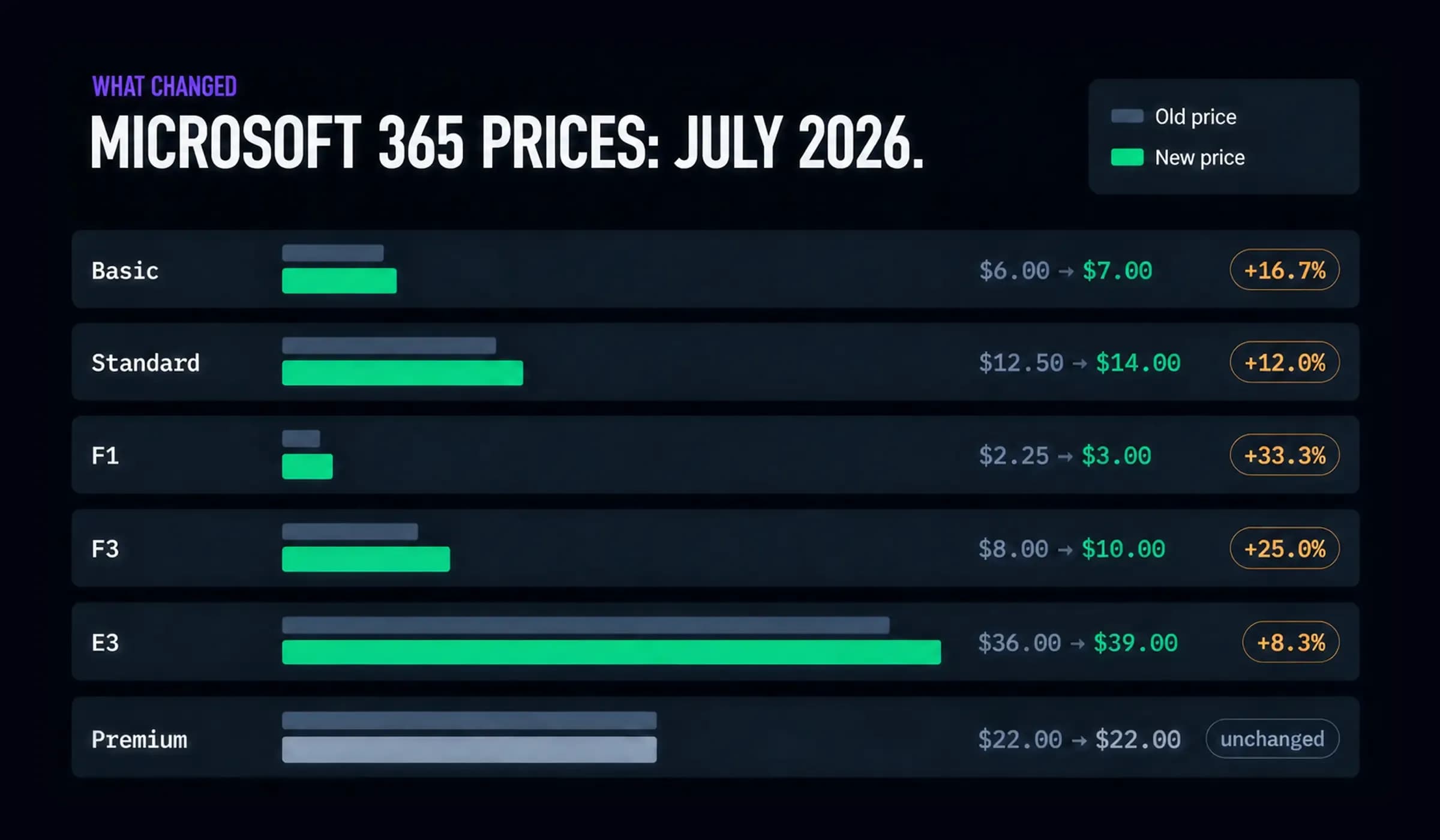
On 1 July 2026, Microsoft raised the prices of nearly every commercial Microsoft 365 plan. Business Basic went up 16.7 percent, from $6 to $7 per user per month. Business Standard rose 12 percent, from $12.50 to $14. Microsoft 365 E3 climbed from $36 to $39 (all list prices as of July 2026). The stated reason: Copilot Chat and additional security features are now part of every plan. Whether your team uses them or not.
For many organizations this is a fair trade — more capability for more money. But if a meaningful share of your licenses exists mainly so people can send and receive email, you are now paying an AI surcharge on a mailbox. That is a good moment to ask what email actually needs to cost, and under whose jurisdiction it needs to run.
What changed on 1 July 2026
The increase was announced in advance and applies to new purchases and renewals — existing annual contracts keep their old price until they renew. The pattern across plans is consistent: the entry tiers took the steepest percentage increases, while Business Premium stayed at $22.
Here is what the change looks like for a 100-seat organization on Business Standard:
Microsoft 365 Business Standard — 100 users
Until June 2026: 100 x $12.50 x 12 = $15,000 / year
Since July 2026: 100 x $14.00 x 12 = $16,800 / year
Difference: + $1,800 / year (+12 %)
An extra $1,800 per year will not sink a 100-person company. The more interesting number is the total: $16,800 a year for a suite — when for a part of the workforce the requirement is a reliable, compliant mailbox with 100 GB of storage. Frontline plans rose even more steeply: F1 went up 33 percent, F3 25 percent. Those are exactly the license types organizations buy in bulk for people who mostly need email.
The surcharge logic — and why it grates
Microsoft's reasoning is that Copilot Chat and Defender features add value to every seat. For knowledge workers who live in Word, Excel and Teams, that can be true. The friction starts where licenses cover warehouse staff, production floors, field technicians, shared functional mailboxes or system senders. Those seats do not draft documents with AI. They send and receive messages — and their price just went up the most.
There is a second, quieter cost dimension: every Microsoft 365 mailbox lives under US jurisdiction. The CLOUD Act allows US authorities to compel access to data held by US providers regardless of where the servers stand. For most businesses this is an accepted trade-off. For public-sector bodies, healthcare, legal, critical infrastructure and anyone whose contracts or regulators say otherwise, it is a compliance question with no license tier that answers it.
European regulation is moving in the opposite direction, toward exit-friendliness: the EU Data Act has applied since 12 September 2025 and abolishes switching charges for data processing services from 12 January 2027, with a maximum 30-day switching window. Translation: leaving a cloud service is becoming a normal, regulated process — not a hostage negotiation.
Who should actually consider an email exit
An honest segmentation, because a wholesale “leave Microsoft” recommendation would be nonsense:
Strong candidates: organizations where a large share of seats are email-first (Basic and Frontline licenses bought for the mailbox); public-sector and regulated organizations with data-residency or jurisdiction requirements; companies running their own infrastructure anyway, for whom mail is one more workload under German law; and anyone paying per-user suite prices for shared mailboxes, notification senders and system mail.
Weak candidates: teams that genuinely live in the suite all day. If Word, Excel, Teams and SharePoint carry your daily work, email is a small part of what you pay for — and Business Premium did not even change price. A mail-only migration there solves a problem you do not have.
Most real organizations are mixed. Which is why an email exit is rarely all-or-nothing: a common pattern is moving email-first seats and system mail to sovereign infrastructure while the suite stays where the suite earns its keep.
How a mail exit works in practice
Email migrations have a reputation they no longer deserve. The protocols are open, the tooling is mature, and the process is incremental:
1. Inventory. Domains, mailboxes, aliases, distribution lists, shared mailboxes, system senders, retention requirements. This is also where you discover which licenses exist only for a mailbox.
2. Target setup. Mailboxes, webmail and DNS groundwork on the new platform: SPF, DKIM and DNSSEC configured per domain before a single message moves — deliverability is decided here, not after go-live.
3. Parallel run. The new environment runs alongside Microsoft 365. Mailboxes synchronize via IMAP, domain by domain; nothing is switched off.
4. Cutover. Once mailboxes are verified complete, MX records switch. Mail in transit is queued and retried automatically by sending servers — messages are not lost during a DNS cutover.
5. Decommission. Licenses are reduced at the next renewal — which, after the July 2026 increase, is exactly when the math is on your side.
The fallback story matters: until cutover, Microsoft 365 remains fully functional. There is no big-bang moment, and every step is reversible.
When staying on Microsoft 365 is the right call
If your organization is suite-native, keep the suite. Deep Teams usage, SharePoint as the document backbone, Power Platform automations, conditional-access policies tied to Entra — these are real switching costs, and email alone does not justify paying them. Business Premium holding at $22 also means the security-heavy tier got comparatively cheaper. The exit case is strongest where the suite is thinnest: mailbox-first seats, regulated data, system mail at scale.
What we do
Hostzero runs secure email hosting in Germany on our own hardware in Frankfurt: GDPR- and ISO 27001-compliant mailboxes with 100 GB each, daily backups, encryption at rest, and a fully open-source stack — Postfix, Dovecot, Rspamd, ClamAV. SPF, DKIM and DNSSEC are configured per domain, deliverability is monitored, and an S/MIME gateway signs outgoing mail server-side for public-sector and regulated communication — with no changes on employee devices. Access works over open standards: webmail, IMAP/IMAPS, POP3 and an API for system mail. Priced per mailbox, under German jurisdiction, with direct engineer access instead of ticket tiers.
FAQ
How much did Microsoft 365 prices increase in July 2026?
Business Basic rose 16.7 percent ($6 to $7 per user/month), Business Standard 12 percent ($12.50 to $14), E3 8.3 percent ($36 to $39), F1 33 percent and F3 25 percent — list prices as of July 2026. Business Premium stayed at $22. Existing annual contracts keep their old price until renewal.
Can we keep Outlook if we leave Microsoft 365?
Yes. Sovereign email hosting works over open standards — IMAP/IMAPS, POP3, SMTP — so Outlook, Thunderbird, Apple Mail and mobile clients keep working. What changes is where your mail lives and under which law, not which client your team uses.
Can we migrate without losing email?
Yes. Mailboxes synchronize via IMAP while Microsoft 365 stays live; DNS is switched only once every mailbox is verified complete. Mail arriving during the cutover is queued and retried automatically by the sending servers.
What about calendars and contacts?
Our managed service focuses on email — the workload with the clearest compliance and cost case. Calendar and contact synchronization over open standards can be part of a dedicated setup; we scope that honestly in the assessment rather than promising a full groupware suite.
Do we have to move everything at once?
No — and most organizations should not. A partial exit is the normal pattern: email-first seats, shared mailboxes and system mail move to sovereign infrastructure; suite-native teams stay on Microsoft 365 for as long as the suite earns its price.
Ready to do the math for your organization?
Talk to an engineer — 30 minutes, no sales pitch. Bring your license list and mailbox count, and we will tell you honestly which seats have an exit case and which should stay on Microsoft 365. Book a free consultation.
Have questions about this topic?
Our experts are happy to advise you on your individual strategy.
Schedule a consultation