
Mac mini colocation for AI agents: running a fleet of Mac minis in a Frankfurt data center
30 Mac minis with AI agents in a Frankfurt rack: €39 per machine and month, switched outlet, isolation and dual feed included. Costs, setup, limits.
Apple's press release for the new Mac mini, published on 25 August 2026, names a use case in its headline: always-on agentic computing. Teams were already doing it. They buy 20 or 30 Mac minis, run an agent on each and then discover that a shelf in the office is not a server room. One Mac mini M6 draws 4 W idle and 70 W at full load, according to Apple. In a Frankfurt data center, each of those machines gets its own rack shelf slot, its own switched power outlet, its own isolated network port and dual-feed power for €39 a month on a 12-month term, from 20 units. This article shows how a Mac mini fleet actually stands in a rack, what goes wrong there, what it costs over three years and when it does not belong in a data center at all. The rack itself is our colocation in Frankfurt.
What happened: the Mac mini became the default agent box
Since OpenClaw went viral in early 2026, the Mac mini has been the machine people buy to run an agent around the clock. The reasons are concrete: very low idle power, a quiet fan, unified memory that runs local models above its price class and native macOS for agents that operate apps, browsers and the screen rather than just an API. Most agent frameworks are orchestration layers: the reasoning usually happens at a model provider via API, while the Mac mini runs the loop, the tools and the files. Apple followed the market: the M6 and M5 Pro generation has shipped since 22 September 2026 and is marketed explicitly for always-on agentic computing.
One Mac mini on a desk is a hobby. Twenty or thirty are infrastructure, and infrastructure has three requirements that an office shelf does not meet: power that does not go out, a network that does not depend on a consumer router and a security boundary between the agents and everything else.
Mac mini model          Idle     Max     Max heat
-----------------------------------------------------
M6, 16 GB, 256 GB       4 W      70 W    239 BTU/h
M5 Pro, 64 GB, 8 TB     6 W      145 W   495 BTU/h
M4, 16 GB, 256 GB       4 W      65 W    222 BTU/h

Fleet of 30 x M6        120 W    2.1 kW
Fleet of 30 x M5 Pro    180 W    4.35 kW

Source: Apple Support, "Mac mini power consumption and thermal
output", published 21.09.2026. Measured at the wall.
Read the table as a budget, not a forecast. An agent that waits for API responses spends most of its time close to idle. A Mac mini running a local model or compiling code sits near the maximum. That difference decides the bill: in a data center you pay for the energy the fleet actually uses, and the peak only decides how the circuits are sized.
How 30 Mac minis stand in a rack
The current Mac mini is 12.7 × 12.7 cm and 5.0 cm tall. One rack unit is 4.45 cm, so a Mac mini lying flat does not fit into 1U; a shelf of flat Mac minis takes 2U. Three rules decide whether the fleet stays cool:
- Airflow front to back. The Mac mini takes in air from the bottom and exhausts to the rear, so the shelf has to leave the rear open.
- No stacking. A Mac mini on top of another one breathes its neighbour's exhaust.
- A shelf built for the footprint. Our shelf system holds four Mac minis per shelf; the 2026 M6 and M5 Pro have the same footprint as the M4 generation and fit the same way. Thirty Mac minis need eight shelves.
Each Mac mini gets its own cable to the switch. The M6 and M5 Pro ship with 2.5 Gbit Ethernet, which negotiates down to a 1 Gbit/s access port without problems. For agents that call APIs and stream a remote desktop, 1 Gbit/s per machine is plenty; 2.5 or 10 Gbit/s ports are available for a surcharge.
What a Mac mini lacks as a server, and how to work around it
A Mac mini is a desktop computer. It has no management controller, no remote console and no second power supply. Four things follow from that, and each one has an answer.
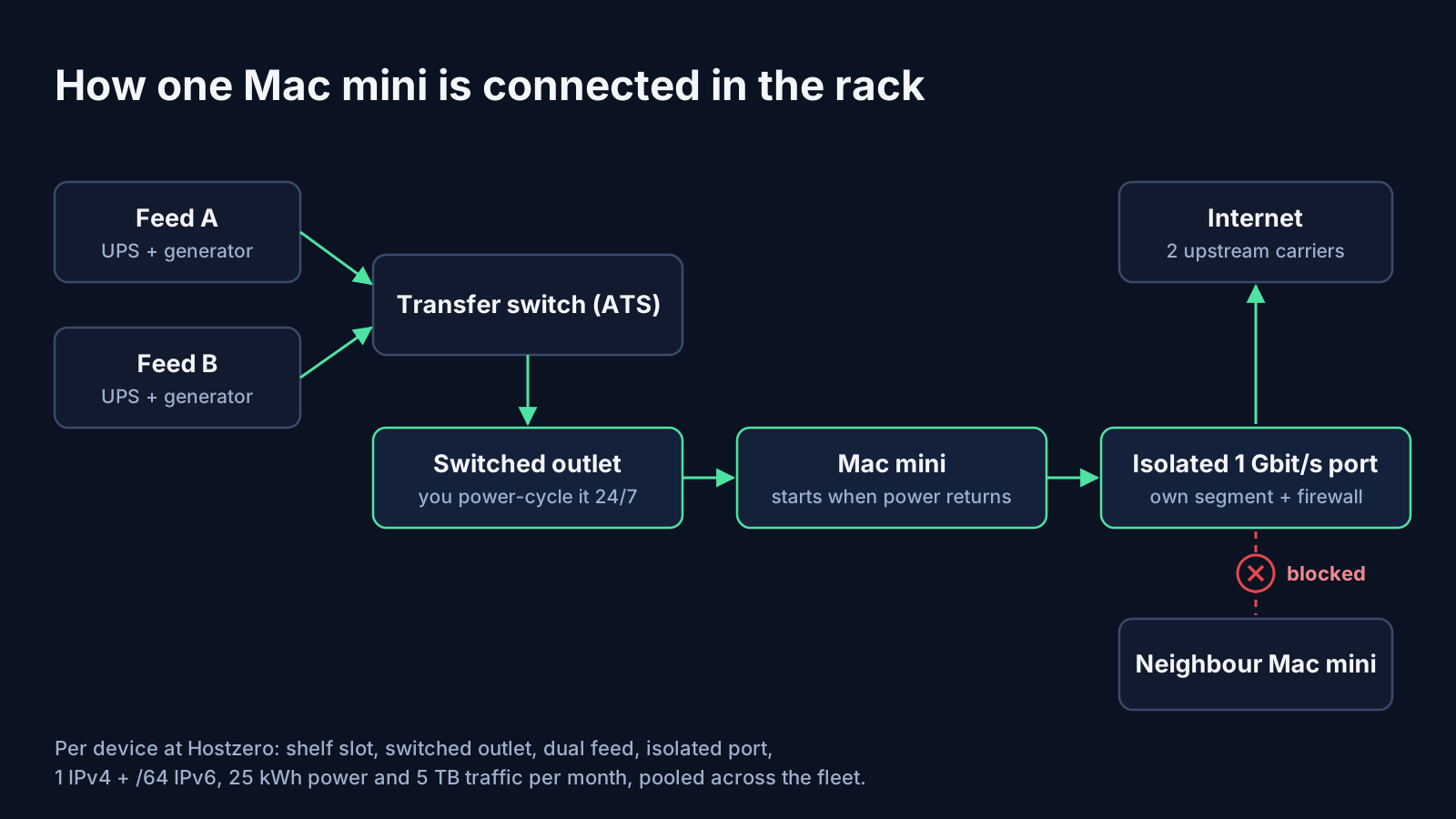
Power on without a finger. The power button sits on the underside. Since macOS Tahoe 26.5, Mac minis introduced in 2024 or later can be set to start whenever power is connected (System Settings → Energy, option "Start up when power is connected": Always). With an individually switched outlet per machine, a hung Mac mini becomes a power cycle you trigger yourself, at three in the morning, without opening a ticket.
One power supply. The Mac mini cannot take two power feeds. An automatic transfer switch in front of it can: it switches the Mac mini between feed A and feed B, so a failing feed does not take the fleet down.
Login after a cold start. Agents that drive the screen need a logged-in user session. Automatic login provides it, but macOS disables automatic login when FileVault is on. You choose: FileVault off and rely on the physical security of a locked rack, or FileVault on and someone unlocks every Mac after each cold start. Decide before shipping the machines, not after the first power cut.
No display. A Mac mini without a monitor often offers screen sharing only at a low default resolution. An HDMI dummy plug makes macOS believe a display is attached. It costs a few euros and saves an afternoon of troubleshooting.
And one rule for the software side: most macOS updates restart the machine. Thirty Mac minis rebooting at the same time take thirty agents offline at once. Stagger the updates, or manage them centrally with an MDM.
Why the agents should not run in your office network
An agent holds the credentials it needs to act: API keys, mail access, sometimes a browser that is logged in to your tools. That makes the machine it runs on a target. CVE-2026-25253, published on 1 February 2026 and rated 8.8 on CVSS, showed how: OpenClaw versions before 2026.1.29 took a gateway address from a link and connected to it automatically, sending the access token along. One click on a crafted link was enough to hand over the agent. The fix had shipped on 30 January 2026, but the lesson stays: the machine an agent runs on must be separated from everything the agent does not need.
In a rack this is ordinary network design. At Hostzero it is the default: every Mac mini sits in its own isolated segment, with port isolation on the access switch and a per-device firewall policy, so a machine reaches the internet and nothing else, not even its neighbour on the shelf. A basic inbound rule set, for example only the ports your remote desktop and management tools need, is included. In an office, the same Mac mini sits on the same network as the accounting laptop.
Three years, 30 Mac minis: what it costs
Option                                    Calculation                        3 years
---------------------------------------------------------------------------------------
AWS mac-m4.metal, on demand, per Mac      $1.23/h x 730 h x 36 months        $32,324.40
  x 30 Macs                                                                   $969,732.00
Mac mini M6, 16 GB, 256 GB, net           EUR 1,049 incl. VAT / 1.19         EUR 881.51
  x 30 Macs                                                                   EUR 26,445.38
Colocation per device, 20+ units,         EUR 39 x 30 x 36
  12-month term                             + EUR 49 setup x 30               EUR 43,590
30 own Mac minis in colocation            EUR 26,445.38 + EUR 43,590         EUR 70,035.38

Colocation includes 25 kWh per Mac mini and month (about 34 W continuous),
pooled across the fleet. Sources: AWS price list (Pricing API), mac-m4.metal,
US regions, 2026. Apple DE press release 25.08.2026. Hostzero offer, October 2026.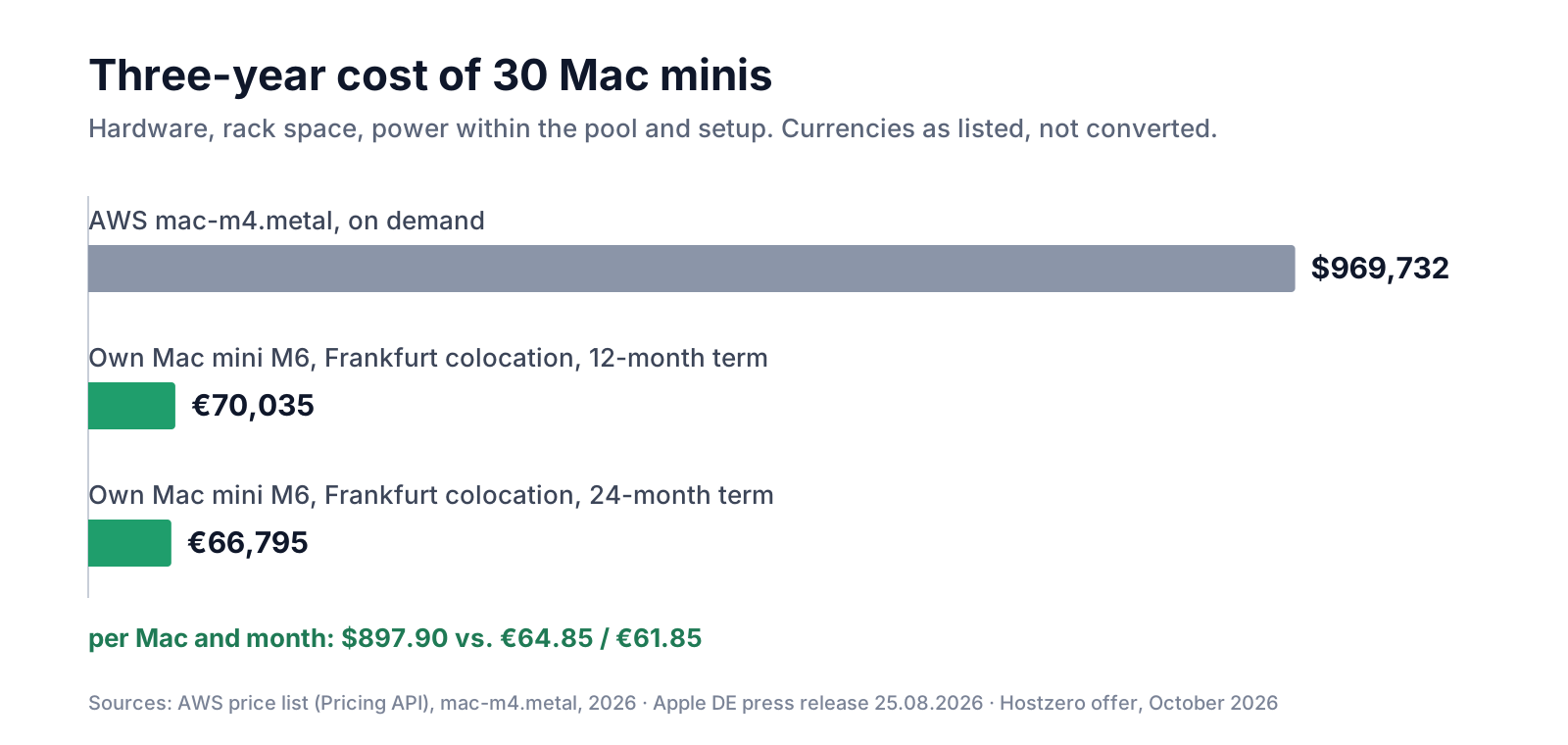
Per Mac mini and month, the own fleet in the rack comes to €64.85 over 36 months: hardware, shelf space, power within the pool, network, isolation, switched outlet and setup included. On a 24-month term the colocation price drops to €36 per machine, and the total to €61.85. The cloud Mac costs $897.90 per month and machine before storage and traffic. The gap has a reason: Apple's macOS licence requires a dedicated host per Mac, which AWS bills for at least 24 hours at a time. A cloud Mac is a rented Mac mini with a meter attached.
What the table leaves out
- Power above the pool. 25 kWh per Mac mini and month cover about 34 W around the clock, which is where agents that mostly wait for APIs sit. Thirty M6 running flat out all month would use 1,533 kWh: 783 kWh above the pool, €313.20 at €0.40/kWh. Local models on M5 Pro units cost more. Measure for a month before you budget.
- Traffic. 5 TB per Mac mini and month are included, pooled across the fleet; a remote desktop stream at 10 Mbit/s around the clock is roughly 3.3 TB. Above the pool, each TB costs €5.
- The AWS instance is an M4 with 24 GB, not an M6 with 16 GB. It is the closest Mac the price list offers, not an identical one. The rate used is the US-region on-demand price; we found no published Frankfurt price at the time of writing.
- Insurance. The Mac minis remain your property and are not insured by the data center. Put them on your own policy.
- A dead Mac mini is replaced by you, not by us. With AppleCare or a spare machine on the shelf, that is a planning question, not a risk.
The office is cheaper on electricity. That is not the comparison.
Honest numbers first. Thirty M6 at full load draw 18,396 kWh a year; at the German business tariff of 17.2 ct/kWh (BDEW electricity price analysis, August 2026, small and medium-sized enterprises) that is €3,164. At idle it is €181. Thirty Mac minis in colocation cost €14,040 a year on a 12-month term. On electricity alone, the office wins.
The rack is not paying for electricity. It pays for two power feeds with UPS and generator, cooling for up to 2.1 kW of heat in one place, two independent upstream carriers instead of an office line shared with the team's video calls, a locked rack that only staff can open, and a switched outlet per machine. Thirty agents that stop together because someone unplugged a power strip cost more than a year of rack space. What the data center includes is on our data center page.
Two ways to put Mac minis in a rack
There are two models, and the difference is who runs the network.
Per device. The data center supplies the shelf, the switch port, the isolation, the switched outlet and the dual feed. You send the Mac minis and get remote access. Billing is per machine, with power and traffic pooled across the fleet. This is the right model for most fleets up to a few dozen machines.
Rack space. You rent rack units, power and one uplink, and bring your own shelf, switch and router. Ten Mac minis on one shelf plus a 1U router and a 1U switch take 4U. Everything behind your router is yours: isolation, firewalling, per-device power switching (with your own switched PDU). This fits teams that already run their own network gear and want full control.
                         Per device                    Rack space, own gear
---------------------------------------------------------------------------------
Price, 12-month term     EUR 45 per Mac (10-19)        2U EUR 139, 3U EUR 169,
                         EUR 39 per Mac (20+)          4U EUR 199, +EUR 30 per U
                         EUR 36 per Mac (20+, 24 mo)
Setup                    EUR 59 / EUR 49 per Mac       EUR 149 one time
Power included           25 kWh per Mac, pooled        100 kWh per month
Above that               EUR 0.40 per kWh              EUR 0.40 per kWh
Dual feed (A/B)          Included, via ATS             EUR 29 per month via ATS
Network                  1 Gbit/s per Mac              1 x 1 Gbit/s to your router
Traffic                  5 TB per Mac, pooled          20 TB (2U), 30 TB (from 3U)
IP addresses             1 IPv4 + /64 IPv6 per Mac     Routed /29 + /56: EUR 12
Isolation                Per device, included          Yours, on your switch
Power cycling            Per outlet, 24/7, included    Whole shelf, or own PDU
Monitoring               Reachability per Mac          Uplink and power feed

All prices net. Month-to-month: per device EUR 49 (10-19) / EUR 45 (20+),
rack space +EUR 20 per month; 3 months minimum. Hostzero offer, October 2026.
Who should keep the Mac mini at home or in the office
- One or two agents, personal use. A Mac mini on the desk is the right tool, and an outage is an inconvenience, not an incident.
- Agents that only call APIs and never need macOS. They do not need a Mac at all: a Linux VM is cheaper and easier to isolate. A Sovereign VPS in the same data center is the smaller step.
- Load that appears for an afternoon and disappears. Then the hourly meter is the right model, 24-hour minimum included.
The rack makes sense when the fleet is ten machines or more, when the agents work with company data or customer accounts, when they must run through the night without someone checking, or when an auditor asks where they run.
Seven questions before you rack a Mac mini fleet
- Mounting: who supplies the shelf, how many Mac minis per shelf, is the rear open for airflow?
- Power: is it billed per kW or per kWh, how much is included, is it pooled across the fleet, and what does every kWh above cost?
- Power cycling: is there a switched outlet per machine that you can trigger yourself, or does every restart need a remote hands ticket?
- Redundancy: does a single-PSU Mac mini get both power feeds through a transfer switch?
- Network: one port per Mac mini, isolation between the machines by default, public IPv4 only where it is really needed?
- Remote hands: what does an emergency cost during and outside business hours, and what does planned hardware work cost?
- Logistics and exit: where do you ship the machines, how long until they run, and how do you get them back?
What we do
Hostzero runs colocation in Frankfurt at Telehouse, operated as Tier III+, on our own network (AS201251) with two independent upstream carriers and DDoS mitigation. Our racks are locked and opened only by our staff. For Mac minis we offer a per-device service: €45 per machine and month for 10 to 19 units and €39 from 20 units on a 12-month term, €36 on a 24-month term, setup €59 or €49 per machine. Every Mac mini gets a slot in our shelf system, an individually switched outlet you control 24/7, dual-feed power through a transfer switch, a 1 Gbit/s port in its own isolated segment, one public IPv4 address and a /64 IPv6, 25 kWh of power and 5 TB of traffic per month, pooled across your fleet, and reachability monitoring. Setup includes mounting, cabling, an HDMI dummy plug and a remote access check with you before go-live. You ship the Mac minis to our office in Arnsberg; we pre-assemble, label and test them and install them in Frankfurt, usually two to three weeks after they arrive. Emergency remote hands cost €35 per started 15 minutes in business hours and €60 outside, 30 minutes minimum. If your agents do not need macOS, a Sovereign VPS is the cheaper answer, and we will tell you so in the first call. All prices net, as of October 2026.
Frequently asked questions
How many Mac minis fit into one rack unit?
None lying flat: the current Mac mini is 5.0 cm tall and a rack unit is 4.45 cm, so a shelf of flat Mac minis takes 2U. Our shelf system holds four Mac minis per shelf; thirty machines need eight shelves.
How much power does a Mac mini fleet need?
According to Apple, an M6 Mac mini draws 4 W idle and 70 W at full load; an M5 Pro draws 6 W and 145 W. Thirty M6 peak at 2.1 kW. What you pay for is energy: at Hostzero, 25 kWh per Mac mini and month are included and pooled, which covers about 34 W around the clock; above that each kWh costs €0.40.
Can a Mac mini in the rack be restarted remotely?
Yes, if two things are in place. Mac minis introduced in 2024 or later with macOS Tahoe 26.5 or later can be set to start whenever power is connected, and each machine needs its own switched outlet. At Hostzero you power-cycle each Mac mini yourself, 24/7, at no extra cost.
Do AI agents on a Mac mini run locally or in the cloud?
Usually both. Agent frameworks such as OpenClaw run the loop, the tools and the files on the Mac mini and send the reasoning to a model provider via API. With 32 GB or more, local models are an option; then the data does not leave the machine, and the power bill rises.
What does Mac mini colocation cost?
At Hostzero, €45 per Mac mini and month for 10 to 19 units and €39 from 20 units on a 12-month term, €36 on a 24-month term; setup €59 or €49 per machine. Power within the pool, traffic, IP addresses, isolation and remote power control are included. Thirty Mac minis cost €1,170 a month on a 12-month term.
Why not just rent a Mac in the cloud?
For a few hours of builds, a cloud Mac works. For agents that run around the clock it is the most expensive option: a dedicated host per Mac, billed per hour with a 24-hour minimum, about $898 a month for one M4 Mac at on-demand rates.
Talk to an engineer: 30 minutes, no sales pitch
Tell us how many Mac minis you run and what the agents do. We will tell you honestly whether a rack, a VPS or the shelf in your office is the right place for them.
*Pricing is accurate as of October 2026
Have questions about this topic?
Our experts are happy to advise you on your individual strategy.
Schedule a consultation